For Family Law Attorneys
Work the whole matter in one place, with less back-and-forth
Your clients arrive with a complete draft already built. From there you run the case where everything lives, review queue, redlines, versions, and a client non-negotiables one-pager, so more of your hours go to legal strategy and fewer to relaying drafts between sides.
Why attorneys recommend CoParent Navigator
Parenting plan drafting is time-intensive. Clients often need multiple revisions to cover basic elements. CoParent Navigator gives them a structured starting point, so you can focus on the legal nuances.

Clients arrive with a complete draft
Instead of a blank intake, your client brings a structured plan they built. You start from something real and spend billable time on legal strategy, not basic data gathering.
Redlines and versions in one place
Review the client's plan, write your own version or edit theirs, and comment inline. Every revision is tracked, so you always know which draft is current and what changed.
A client non-negotiables one-pager
Your client's must-haves are captured in a single reference, so you walk into negotiations knowing exactly where there's room and where there isn't.
Gaps flagged before filing
The plan evaluator surfaces incomplete sections, vague provisions, and potential enforcement issues while there's still time to fix them.
Send provisions for signature
Send individual clauses to the parents for electronic signature as each one settles. Every signature is timestamped, so agreements are adopted the moment they're reached instead of quietly reopened.
The mediation board is yours too
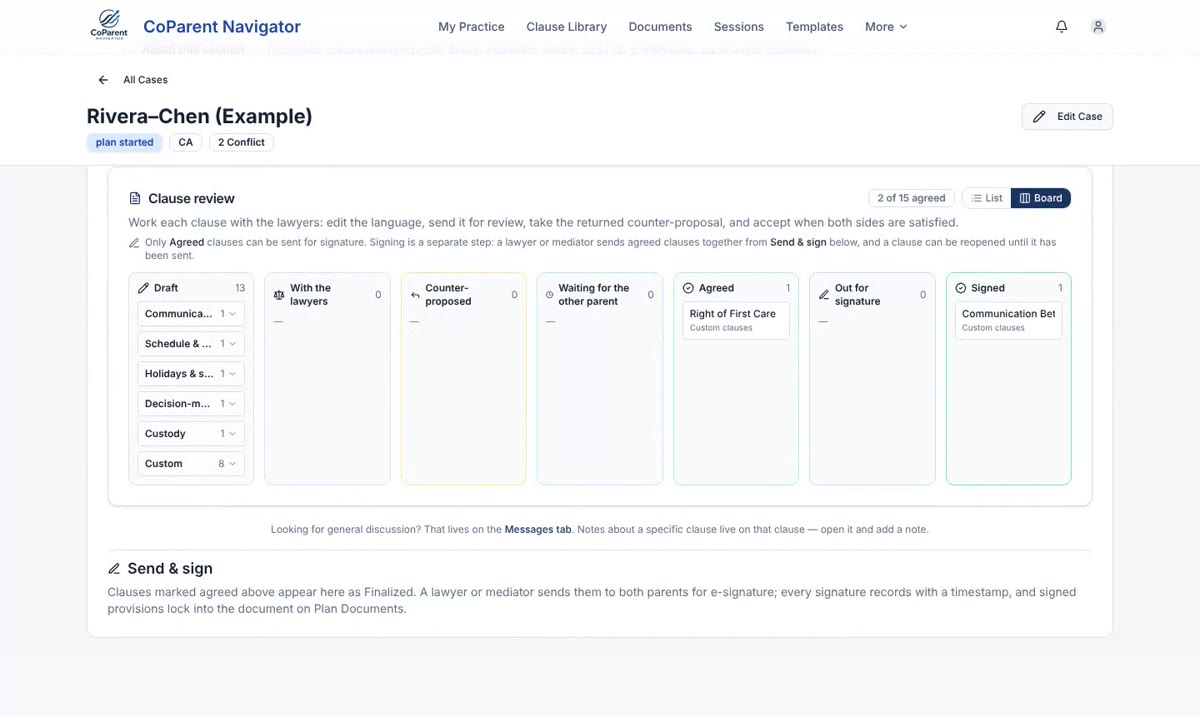
Every professional account includes the full mediation toolset. If you also mediate — or just want the view — the Kanban board populates before and after each session, so you get a quick visual of exactly which clauses are agreed and which still need negotiating.
One professional workspace — attorneys and mediators, one price
CoParent Navigator doesn't sell a separate attorney product. Every professional gets the same workspace at the same price, and your role is set per case: where you're counsel you get the review queue, redlines, and versions — and the mediation tools are included whenever you want them. Take the mediator role on a case, or simply follow its mediation: the Kanban board populates before and after each session, giving you a quick visual of which clauses are agreed and which still need negotiating. Many family-law professionals wear both hats — you shouldn't pay twice for that.
Important: CoParent Navigator is not a legal service
We don't provide legal advice, represent clients, or replace attorney-client relationships. CoParent Navigator is a structured drafting and preparation tool designed to complement the work of licensed family law professionals. All plans should be reviewed by a qualified attorney before use in legal proceedings.
See how it works for your practice
Build a complete parenting plan with CoParent Navigator, the child-centered way to a custody agreement that holds up.