For Mediators
Walk into every session already knowing where they agree
Blind, parallel prep has both parents answer privately before the session, so you arrive already knowing where they align and where the real work is. Sessions get shorter and agreements come faster, and you generate the first-draft plan straight from what they agreed. Less billable time in the room, more progress in it.
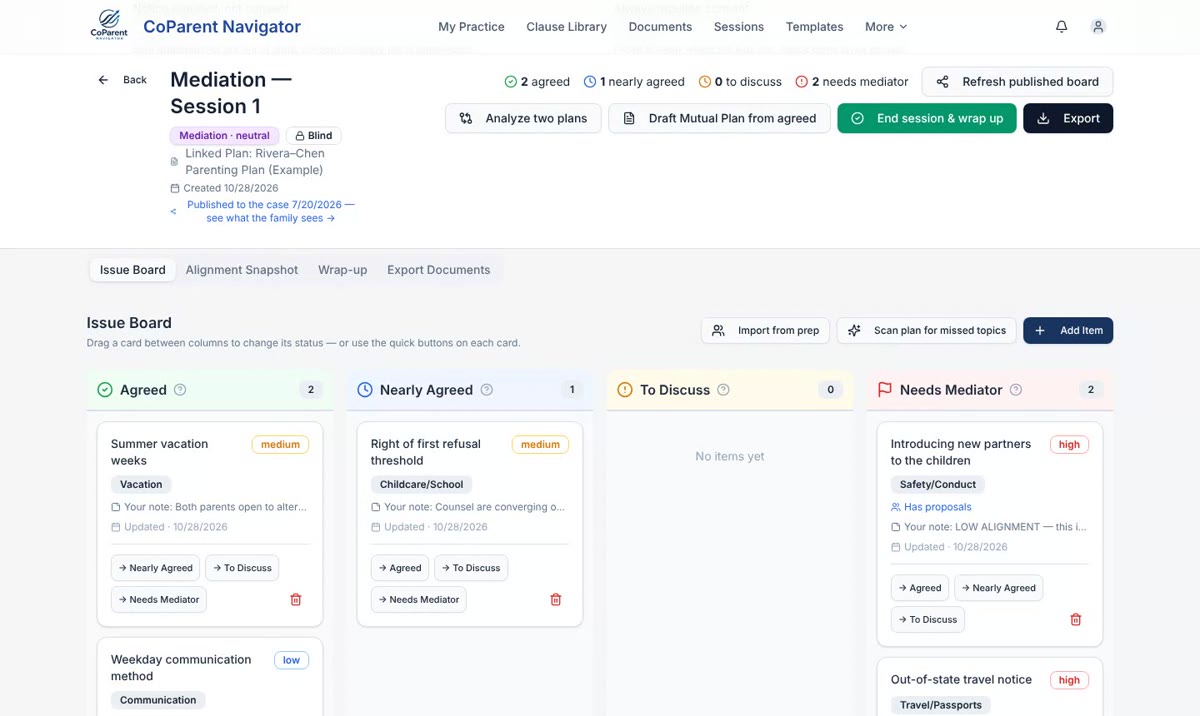
The challenge mediators face
Sessions burn time re-establishing where each parent stands. When prep is disorganized or one-sided, you spend the first hour discovering positions instead of resolving them. Blind, parallel prep does that discovery before anyone sits down, so you open the session already knowing where the real work is.

Blind, parallel prep
Both parents answer the same questions privately before the session. Neither sees the other's responses until you reveal them, so you walk in knowing exactly where they already agree.
See the gaps before the room
Where they align is settled fast. Where they diverge is surfaced up front, so session time goes to the handful of decisions that actually need you.
First draft from what they agreed
Generate the initial plan straight from the parents' aligned answers, then refine it together instead of drafting from a blank page.
Fewer, shorter sessions
Preparation and drafting happen between meetings, so momentum holds and agreements come faster, less billable time in the room.
Sign what they agree, as they agree it
Send the provisions they've settled to both parents for electronic signature right away, so progress is captured session by session instead of waiting on one final sign-off.
How mediators use CoParent Navigator
- 1
Join the case as its mediator
Two ways in: parents invite you onto their existing case as the mediator, or you start the case yourself and add both parents. Either way, on that case you hold the mediator role and its tools.
- 2
Run a live session board — prep optional
Open a live session whenever you're ready: add issues in the room, pull clauses from the library, and move cards across the board (To Discuss → Nearly Agreed → Agreed) as the conversation moves. Parent prep is never a prerequisite.
- 3
Or have them prep blind and in parallel first
Each parent answers the same questions privately; neither sees the other's responses. Once both finish, the aligned and divergent answers are revealed to you, so you open the session already oriented.
- 4
Generate and refine the first draft
Build the initial plan from what they agreed, then work the remaining decisions together, run the evaluator to catch gaps, and send settled provisions for signature.
One professional workspace — mediators and attorneys, one price
CoParent Navigator doesn't sell a separate mediator product. Every professional gets the same workspace at the same price — and as a mediator you get the full professional suite, not a trimmed-down corner of it: the Document Center with version compare and redlining, the clause library, per-clause e-signature, the plan evaluator, and drafting tools, alongside your session board. Your role is set per case: where you're the assigned mediator you run the board, and if you also practice as an attorney, the cases where you're counsel sit right beside them with the lawyer tools. Many family-law professionals wear both hats — you shouldn't pay twice for that.
See how CoParent Navigator fits your practice
Build a complete parenting plan with CoParent Navigator, the child-centered way to a custody agreement that holds up.